Home AI - AI Interior Design
- 4.3
- Rating
- 10.00M
- Installs
- Free
- Price

 Analysis by App-foxy
I tried Home AI - AI Interior Design as a practical way to rethink rooms before moving furniture, choosing colors, or spending money on decor. It belongs to the lifestyle category, comes from HubX, and is aimed at people who want an AI-assisted starting point rather than a traditional interior-design consultation. My first impression was that it is most useful when I already have a real room in mind and need several visual directions quickly.
The app is free to install and is suitable for everyone, which makes it easy to test without committing immediately. It has an average rating of 4.4 from around 967 thousand ratings and has passed 10 million installs, so it is clearly not a niche experiment. Still, popularity does not automatically make it the right tool for every project. The important question is whether its visual suggestions help you make a better decision than browsing furniture photos or using a conventional room planner.
How Home AI fits into a real decorating project
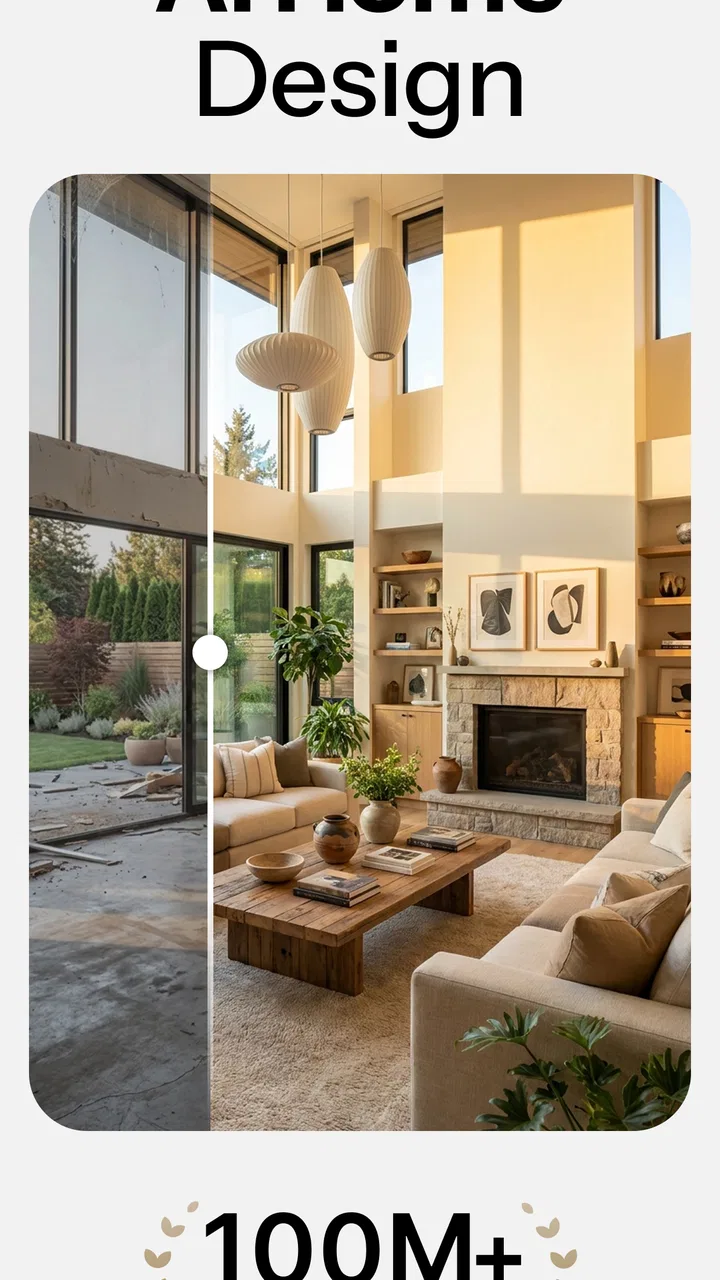
The basic idea is simple: use an existing room as the starting point, then explore possible interior directions with AI. That makes the app different from a blank-canvas planner. Instead of building a room piece by piece from a catalog, I can begin with the space I actually have and use generated concepts to imagine a new atmosphere.
You May Also Like

 Blood Strike: 2.5 Anniversary
Blood Strike’s Loadouts Turn Every Drop Into a Tactical Gamble
A close look at Blood Strike’s custom loadouts: how fast access to signature weapons reshapes its battle royale rhythm, rewards preparation, and narrows the gap between fights.

 Pandora - Music & Podcasts
Pandora’s Music Is Easy to Start, but Harder to Recover
Pandora’s strength is its low-effort path from a seed to a station. Its weak spot is how much confidence it asks you to place in connection, setup, and quiet recovery.

 8 Ball Pool
 Is Built on Rivalries, Rematches, and Routine
A close look at the rivalries, rematches, shared routines, and unanswered safety questions that turn a quick pool match into a persistent mobile community.

 Samsung Music
’s Quiet Strength Is Playing What You Already Own
Its reach comes less from spectacle than from dependable access to a personal library. That simplicity is both the app’s strongest retention engine and its ceiling.

 AccuWeather: Weather Radar
AccuWeather Review: A Quick, Clear Forecast for Everyday Decisions
For everyday plans, the best forecast is the one you can understand quickly. AccuWeather makes rain timing, radar, and local conditions easy to act on, with a few trade-offs.

 Hill Climb Racing
Why Hill Climb Racing Still Turns Crashes Into One More Run
A tiny car, a bumpy hill and one more upgrade: Hill Climb Racing keeps resurfacing because its simple chaos makes every near-miss feel personal.
More From Our News Desk
View All News


That distinction matters in everyday use. A conventional planner is usually stronger when I know the exact dimensions, the furniture I want, and the position of every door or window. Home AI is more appealing at the earlier stage, when I am asking questions such as, “Would this room feel better with lighter colors?” or “Could this corner work as a calmer workspace?” It works as a visual brainstorming companion rather than a replacement for a measured floor plan.
I found that the quality of the result depends heavily on the starting image and the clarity of the idea. A tidy, well-lit photo gives the app a more useful foundation than a dark image filled with temporary clutter. Before using a room photo, I would remove laundry, boxes, and anything that hides the walls or floor. This small preparation step makes the output easier to judge and prevents me from confusing a messy source image with a poor design suggestion.
One useful workflow is to photograph the room from the same position each time and change only the design direction. For example, I might first explore a warm, natural look, then a cleaner modern style, and finally a more colorful option. Comparing those variations side by side is more helpful than generating random ideas without a clear question. It also reveals which elements I genuinely like, such as brighter walls, less visual clutter, or a stronger contrast between furniture and flooring.
What the free starting point gives you
Home AI is free to install, so the sensible approach is to test it with one room before treating it as an essential decorating tool. The free entry point lowers the risk for someone who is only curious, renting a home, or planning a small refresh. I would not buy paint, furniture, or lighting based on one generated image, but I would use the app to narrow down the directions worth investigating in person.
There are in-app purchases ranging from $4.99 to $64.99 per item. That is a wide spread, so the value depends on what access each purchase provides in the version available to you and how often you plan to use the app. I would treat the lower-priced option as a possible convenience purchase for an active project, while the higher end needs much more justification. If you only want a few ideas for a single room, paying at the upper end may be difficult to defend.
The app does not need to be useful only for major renovations. I can see a free trial being worthwhile for smaller decisions: testing whether a reading nook should feel cozy or minimal, imagining a guest room before buying textiles, or finding a direction for a room that has accumulated mismatched furniture. In those cases, the main value is reducing indecision, not producing a final shopping list.
It is also important to separate visual inspiration from technical accuracy. A generated concept can suggest a mood, palette, or arrangement, but it should not be treated as proof that a sofa will fit, that a walkway is wide enough, or that a particular material will look the same in daylight. I would still measure the room, check product dimensions, and view physical samples before making an expensive purchase.
Where the app delivers more value than ordinary browsing
Browsing image boards and furniture websites can provide inspiration, but those images usually show someone else’s room. Home AI has a practical advantage because it starts with my own space. Even when the result is not perfectly realistic, seeing a familiar room transformed can make an abstract idea easier to discuss with another person.
That is especially useful when two people disagree about a change. Instead of arguing over whether a darker wall would feel too heavy, I can use the room as a visual reference and compare a few directions. The image does not settle the decision, but it turns a vague preference into something concrete. For couples, families, or roommates, that can save time during the early planning stage.
Another non-obvious use is identifying the design principle behind a look I like. Rather than copying every visible object, I can examine the image for broader choices: repeated wood tones, fewer competing colors, a lower-contrast palette, or a clearer focal point. I then apply those principles using furniture and decor I already own. This is a better use of AI imagery than assuming every generated item must be purchased.
I also like the possibility of using it before contacting a professional designer. A homeowner who feels unable to describe a preferred style can prepare a small set of visual directions first. That can make a later consultation more efficient because the conversation starts with examples instead of vague labels such as “modern but comfortable.” For a simple room refresh, the app may be enough; for structural work, it is better viewed as preparation.
For renters, the value is different. The app can help explore reversible changes such as textiles, lamps, artwork, and movable furniture without encouraging permanent alterations. I would be cautious with any concept that suggests changing walls, built-ins, or flooring, since a visual preview does not change the rules of a rental agreement. Used selectively, though, it can help make a temporary home feel more intentional.
Practical limits I noticed while judging the results
AI-generated interiors are persuasive because they look finished, but that polish can hide practical problems. Furniture may appear more neatly arranged than it would be in real life, and decorative details may not correspond to products I can actually buy. I therefore use the images for direction rather than measurement. The closer the project gets to spending significant money, the more I rely on real dimensions and product photos.
Room geometry is another important limitation. A photo shows perspective, not a complete plan. A corner can look larger or smaller depending on the camera position, and a doorway may be easy to overlook. If I need to plan a precise renovation, a dedicated floor-plan or room-measurement app is the better companion. Home AI is stronger at visual mood and broad transformation than at construction-level planning.
There is also a risk of becoming distracted by attractive but impractical concepts. A beautiful room may depend on more storage, better natural light, or furniture that is unsuitable for children or pets. I would review every suggestion through ordinary questions: Where will daily items go? Can the floor be cleaned easily? Is the seating comfortable? Will the design still work when the room is being used rather than photographed?
Another trade-off is control. A traditional planner gives me deliberate control over dimensions, objects, and placement, while an AI approach is faster but less predictable. If I want to specify the exact sofa, table, rug, and cabinet, I would rather use a catalog-based tool or a manual design program. If I want to discover a direction I had not considered, the AI approach is more stimulating.
The current version is 1.6.8, and it requires Android 7.0 or later. That makes compatibility fairly approachable for many Android users, although device performance and camera quality can still affect the experience. The app is rated for everyone, which suits its general lifestyle focus, but parents should still make their own judgment about children using image-generation tools and making purchase decisions.
A realistic weekend scenario
Imagine I am preparing a living room for everyday family use. The room has a sofa I want to keep, a television, a small table, and too many loose objects. I would begin by clearing the floor and taking a straightforward photo from the entrance. Then I would explore a few distinct directions instead of asking for endless variations of the same look.
In the first direction, I might prioritize warmth and storage. In the second, I might test a lighter, more open appearance. In the third, I could explore a stronger color accent while keeping the existing sofa. After reviewing the results, I would not copy one image literally. I would note the recurring ideas that improve the room: perhaps fewer visible objects, a more consistent color family, and a better-defined area for reading or relaxing.
Next, I would measure the wall, check the sofa’s position, and compare those observations with real furniture dimensions. If a generated cabinet looks useful, I would search for an appropriately sized alternative rather than assuming the pictured item exists. This is where Home AI saves time: it helps me decide what kind of solution to look for before I begin shopping.
For a small bedroom, I might use the same process but pay more attention to circulation and storage. A visually calm design is not successful if it blocks a wardrobe or leaves no space beside the bed. The app can encourage a useful conversation about atmosphere, but I remain responsible for translating that atmosphere into a workable arrangement.
Who will get the strongest value
I think Home AI is a good fit for people who know their room feels wrong but cannot yet explain why. It is also useful for anyone who wants a quick visual prompt before repainting, rearranging, or discussing a project with a partner. Students, renters, first-time homeowners, and casual decor enthusiasts can all benefit from seeing possibilities based on a real space rather than a generic showroom.
It is particularly helpful when the budget is limited and the goal is to make better use of existing possessions. The best result may be a decision to move furniture, remove visual clutter, or repeat one color already present in the room. In that situation, the app supports restraint instead of encouraging a complete shopping spree.
I would be more cautious recommending it to someone planning a precise kitchen renovation, a bathroom remodel, or any project involving plumbing, electrical work, structural changes, or strict accessibility requirements. Those projects need measurements, technical drawings, material specifications, and professional judgment. A lifestyle visualization app can help with appearance, but it should not be the main planning instrument.
People who dislike experimentation may also prefer a conventional tool. The appeal here is the ability to explore ideas quickly, and that naturally involves some unpredictability. If I already have a fixed design and need exact control over every object, a manual planner will likely feel less frustrating. Home AI makes more sense when I am open to suggestions and willing to filter them intelligently.
How it compares with common alternatives
Compared with browsing social media or design galleries, Home AI is more personal because the starting point is my room. Galleries are better for discovering broad styles and seeing professionally finished spaces, but they can make a project feel unrealistic. Home AI brings the idea closer to home, even if the generated result still needs a reality check.
Compared with a manual room planner, it is quicker at producing a visual mood and weaker at exact control. A manual planner is the better choice for checking whether furniture fits, testing several floor-plan arrangements, or building a dependable shopping plan. Home AI is the better first step when I am still deciding what kind of room I want.
Compared with hiring an interior designer, the app is far less personal and cannot replace professional advice for complex work. Its advantage is accessibility: I can explore ideas on my own schedule and arrive at a consultation with clearer preferences. Its weakness is that it does not know my habits, budget, maintenance tolerance, or building constraints unless I account for those myself.
That comparison explains the app’s real position. It is not the final authority on interior design, and I would not use it as one. It is a fast visual filter that can help me move from uncertainty to a shortlist of sensible directions.
My value judgment before paying
The free installation makes experimentation reasonable, but I would not assume that every user needs an in-app purchase. Someone decorating one room may get enough value from trying the available experience and applying the ideas manually. A person working through several rooms, repeatedly comparing styles, or using the app as part of a larger planning process may find paid access more worthwhile.
Because individual purchases can range from $4.99 to $64.99, I would decide based on frequency and project size rather than on excitement after seeing one attractive image. The lower end may be easier to justify for a focused task, while the highest-priced option deserves careful consideration. I would only pay after confirming that the available access solves a specific problem I have, such as needing more exploration during an active redesign.
The app’s strong audience reach and 4.4 average suggest that many people find the concept useful, but my recommendation remains conditional. It delivers the most value when I treat the output as a conversation starter, not a finished specification. The more disciplined I am about measuring, checking products, and keeping my existing needs in view, the more helpful the visual suggestions become.
My verdict: try it free if you want fast ideas for a real room, but skip the expensive commitment unless you have a continuing design project. Home AI is a convenient lifestyle app for exploring color, atmosphere, and broad room direction. I would recommend it to curious decorators, renters, and homeowners at the inspiration stage. I would skip it for exact renovation planning or anyone who wants complete manual control. Used with those limits in mind, it can turn a vague decorating problem into a clearer, more manageable next step.
FAQs for Home AI - AI Interior Design
01What features does Home AI - AI Interior Design offer?
Home AI provides a wide range of features including virtual room layout suggestions, furniture placement optimization, and color scheme recommendations. The app uses AI to analyze your space and personal style preferences to generate tailored interior design options. Additionally, it offers a 3D visualization tool to see changes in real-time.
02Is Home AI suitable for beginners in interior design?
Yes, Home AI is designed to be user-friendly, making it suitable for beginners. The intuitive interface and step-by-step guides help users easily navigate the app. Whether you are new to interior design or a seasoned professional, Home AI offers insights and recommendations that cater to all levels of expertise.
03Can I use Home AI to design commercial spaces?
While Home AI is primarily geared towards residential spaces, it can also be used for small commercial projects. The app’s AI capabilities can adapt to different types of spaces, providing design solutions for offices, cafés, and retail stores, making it a versatile tool for various design needs.
04Does Home AI support collaboration with professional designers?
Yes, Home AI allows users to collaborate with professional designers. Users can share their design projects with professionals for feedback and further customization. This feature is particularly beneficial for those who wish to combine personal creativity with expert advice, ensuring a more polished outcome.
05What platforms is Home AI available on?
Home AI is available for both Android and iOS devices. The app is designed to be compatible with the latest operating systems, ensuring a smooth and efficient user experience. Users can download it from the Google Play Store or the Apple App Store, depending on their device.
Pros
- User-friendly interface for easy navigation.
- Wide range of design styles available.
- Real-time visualization of ideas.
- AI suggestions improve creativity.
- Quickly adapts layouts to preferences.
Cons
- Limited free features without subscription.
- Occasional lag in rendering designs.
- AI suggestions can be repetitive.
- Requires stable internet connection.
- Some styles lack customization options.

Home AI - AI Interior Design
Gallery